A spreadsheet, not a CSV
This started as a CSV of seventeen columns and was changed because of
who downloads it. A CSV opened in Excel is a dialogue about delimiters
followed by timestamps imported as text: a file that looks broken
before it looks useful. An .xlsx arrives with numbers as
numbers and times as times, and that is most of the point of it.
Rewriting the format was also the moment to stop shipping a rectangle. Of those seventeen columns, nine were the same value on every one of thirteen thousand rows — the furnace id, the programme, the segment count — or derivable from the others. A constant repeated thirteen thousand times is not data; it is noise with a column heading. So the file is three sheets, divided by how often a value changes, which is also the only division a reader can predict: if it is the same all firing it is on the first sheet, if it is the same all segment it is on the second, and if it moves it is on the third.
Sheet one — Firing
The cover page: everything that is true of the whole run, as labels down the left with values beside them rather than a one-row table twenty columns wide. This sheet is read, not sorted, and a block of pairs survives having a line added to it where a wide table grows a column somebody has to scroll to.
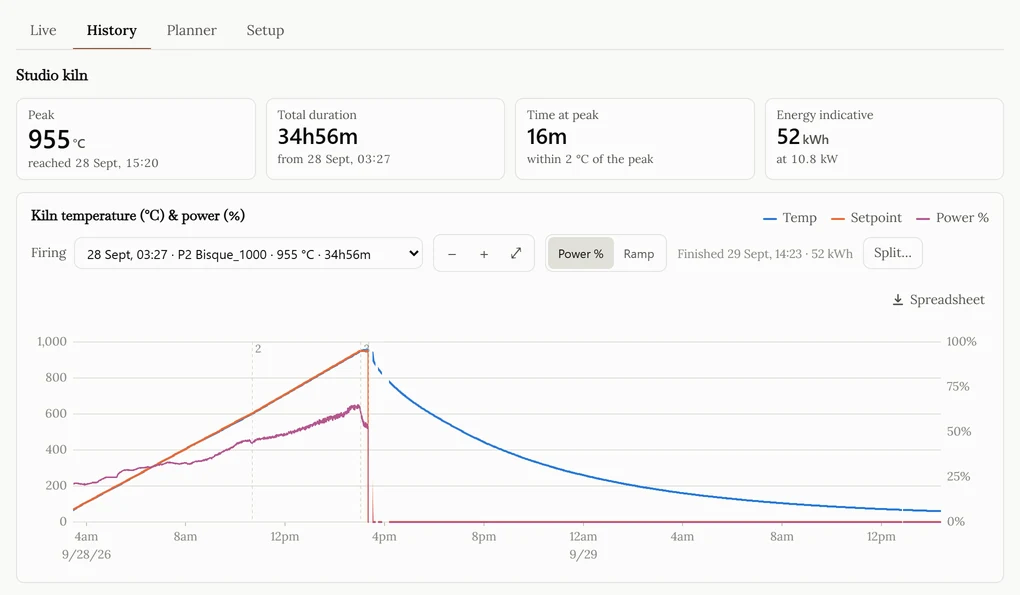
It carries the furnace and its id, the programme name and number, when the run started and ended, its duration both as “9 h 14 min” and as a plain number of minutes, the peak temperature and the moment it was reached, how many readings are in the file, and the typical interval between them.
Three of those are worth a sentence each. The peak is
counted off the rows in this very file rather than copied from a
summary, so the temperature named at the top always appears on the
sheet below it. The typical interval is the median gap,
not the mean: a logger restarted once leaves a single two-hour hole,
and a mean would report the whole firing as having been sampled every
forty seconds. And errors are listed by when each one
began — an error code persists until it is cleared, so
listing every reading that carried one would say “something went
wrong” six hundred times and when it started nowhere. A firing
with none says none, in the word, rather than leaving the
cell blank; an empty cell says “we did not look”.
The sheet also says what it does not know. A run whose beginning was
never recorded is marked Partial, because its start, its
peak and its duration are then floors rather than facts, and a file
outlives the browser tab it was downloaded from. A run still burning
says so. And where the readings contain both the moment the controller
started saying it was running and the moment it stopped, there is a
line giving that span and noting that what follows it is cooling
— omitted entirely, not half-written, when only one of those two
moments is in the file.
Sheet two — Segments
One row per segment the readings passed through, with these columns:
segment, type, segment_end_c,
began, duration_min,
set_rate_c_per_h and
achieved_rate_c_per_h.
The last two are why this sheet exists. A programme asks for a rate and the kiln either keeps up or does not, and a kiln that has lost an element holds its setpoint perfectly while falling further behind every minute. The only way to see that is the two rates side by side. Both are a least-squares fit through the segment rather than last-minus-first over the elapsed time — a thermocouple jitters by a few tenths, and endpoints alone move the answer by a quarter of itself — and both are timed by the controller’s own clock where it is complete, because the poll clock measures HTTP round trips to somebody else’s cloud rather than the interval between two measurements. A segment with fewer than three readings gets empty cells instead of a number: two points fit a line exactly, including two points that are mostly noise.
The stretch after the programme stops is its own row, typed
cooling. Its rate comes out negative, which is not an
error — it is the cooling curve, and it is the part of a firing
potters argue about most. It is split off on the controller’s
state changing and deliberately not on the power reaching zero, because
a hold sits at zero power too, and using power would cut the last hold
in half and call the first part of it cooling.
Sheet three — Readings
The series itself, and only the columns that move: time,
kiln_time, temp_c, setpoint_c,
power_pct, segment and
remaining_min. One row per reading, for the whole firing.
Two clocks, side by side, because they answer different questions.
time is when our poller received the reading;
kiln_time is the controller’s own stamp for the
measurement, which is the one to line this file up against the
controller’s log or against anything else that happened in the
studio. On the live kiln the two differ by about eight seconds. For a
controller that sends no timestamp the second column is genuinely
empty rather than a zero date, which would be an invention.
Which clock the file is on
The times in the file are written in your timezone, which the page tells the server when you press the button. Not UTC, because UTC is a thing you have to convert in your head and the clock that matters is the one on the wall by the kiln. Not the server’s either: this runs on a box whose clock is UTC, so “local time” computed there would mean nothing at all.
The Firing sheet names the zone in words — for example
Asia/Kolkata (UTC+05:30) — because a spreadsheet date
carries no timezone anywhere in the format, so the only way a reader
can know what the numbers mean is for the file to say so. The offset is
taken at the firing’s own moment rather than at today’s, so
a run fired in July and read back in January is labelled with the
offset it was fired under. The file is named for the kiln, the date and
the programme.
How a firing gets into the log at all
By temperature, and by nothing else. A firing begins when the kiln passes 65 °C and ends when it falls back under 60 °C, and the list builds itself. Both thresholds are yours to change; those are the defaults.
Temperature rather than the controller’s own process state, which sounds like the obvious signal and is not: that state says “running” for a programme that was started and abandoned, and says nothing at all through the hours of cooling that whoever loaded the kiln still counts as part of the same run.
Runs under fifteen minutes are dropped. A test of the elements, a door left open with the heat on, or a single wild poll from a glitching controller will all cross the start threshold, and nothing anybody would call a firing is over in a quarter of an hour. That only applies to runs that have ended — a blip is recognisable as one only once it has stopped, and a kiln that is hot right now belongs on the page whatever its age.
Two firings run together can be split. If the kiln was unloaded and refilled while still hot, the temperature never falls back through the stop threshold and the log honestly reports one long run. Only the person who opened the door knows otherwise, so there is a button: you mark the moment, and from then on they are two firings with two graphs and two spreadsheets. It is reversible, it works on a firing that is still burning, and it gives the same two firings whether you do it before or after the run has been archived.
An hour after it ends, it is filed away
About an hour after a firing finishes it is archived whole, at full reading-by-reading resolution, and it stays in your list and stays downloadable exactly as it was. Nothing about the firing picker, the graph or the spreadsheet button changes; where the readings came from is not your problem.
The hour is not caution for its own sake. A run that finished two minutes ago may still be having its last readings flushed through, and archiving it then would write a file missing its own tail — which, since the readings are cleared afterwards, would lose that tail for good. An hour is far longer than that cycle and costs nothing: the firing is over.
See one, or keep your own
Look around a real firing — finished firings from a real kiln, with the graphs and the spreadsheets they export to, no account and no sign-up. Then connect your own kiln, which needs your Nabertherm app login and an email address.
Not sure the dashboard reads your controller? Which Nabertherm kilns this works with is the long answer. If it is still not clear, ask me — I read these myself.