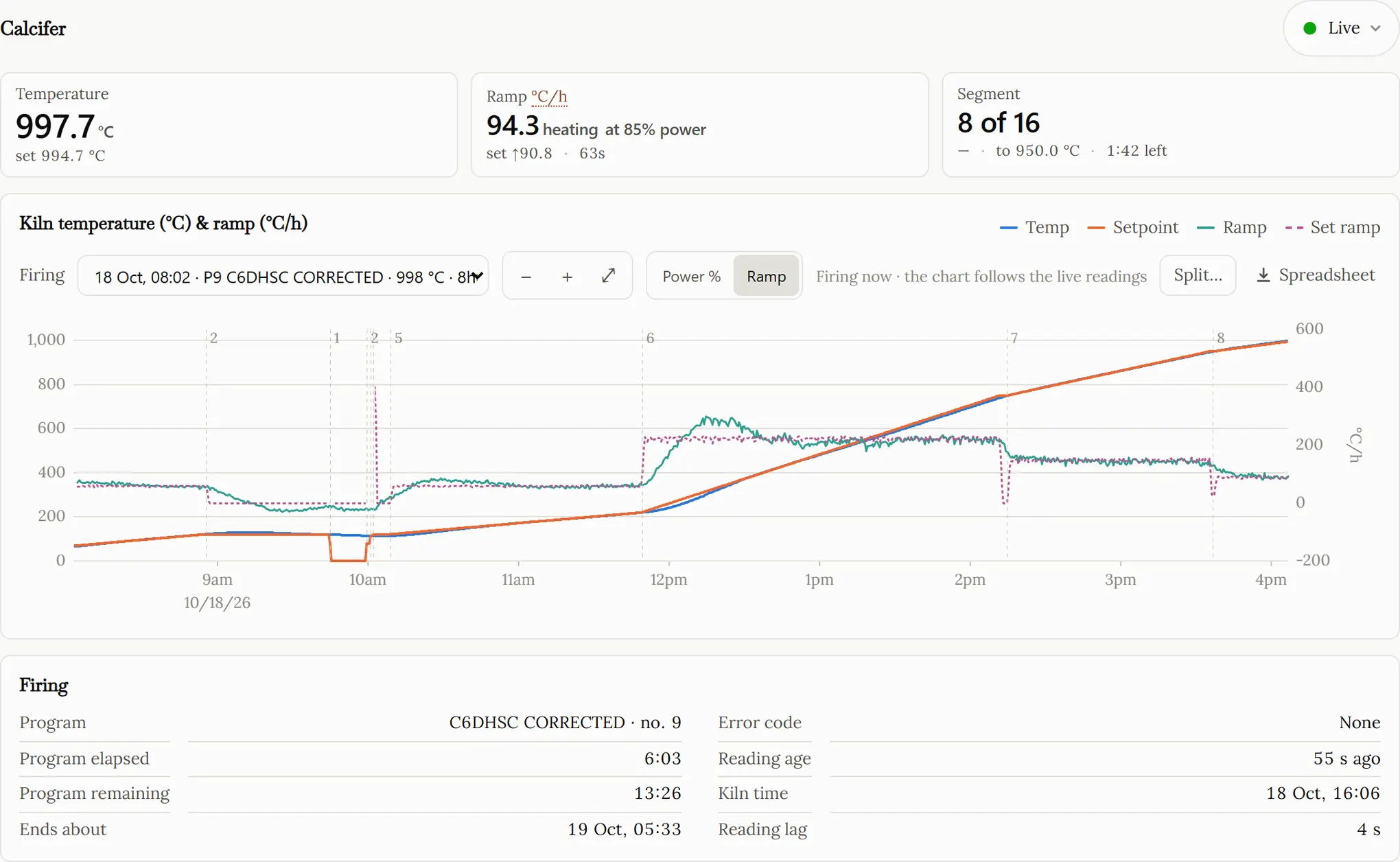
What you see
Three figures, large, at the top of the page. The temperature, with the setpoint the controller is driving to underneath it. The ramp rate, in degrees per hour or per minute, against the rate the programme asked for — a kiln that has lost an element holds its setpoint perfectly and falls further behind every minute, and this is where that shows. And the segment: which one of how many, the temperature it finishes at, and how long it has left.
Under them, the whole firing as a chart — temperature, setpoint and element power. Switch the right-hand axis and it draws the achieved ramp against the commanded one instead. Below that, the programme name, how long it has run, how long is left, and the controller’s error code if there is one.
The ramp rate is measured, not read off the programme: a least-squares fit through the last minute of readings, timed by the controller’s own clock rather than by when our poller heard back. While the kiln is working its cloud is asked every ten seconds. When it is cold and idle, every five minutes.
Every firing, kept
You do not start or stop anything. A firing begins when the kiln passes 65 °C and ends when it falls back under 60 °C, and the list builds itself. Runs under fifteen minutes are dropped. If the kiln was unloaded and refilled while still hot, so two firings ran together as one, you can split them.
Pick a firing and the chart draws it. The spreadsheet button beside the
picker hands you that run as an .xlsx in three sheets.
Firing is the summary: furnace, programme, start and
end, duration, peak temperature and when it was reached, the number of
readings, and any error codes the controller raised.
Segments gives one row per segment, with the rate it
asked for beside the rate it achieved. Readings is the
series itself — time, kiln time, temperature, setpoint, power %,
segment, minutes remaining. The file is named for the kiln, the date and
the programme.
About an hour after a firing ends it is filed away whole, at full reading-by-reading resolution, and it stays in the list and stays downloadable.
What you need
A Nabertherm kiln whose controller reports to the manufacturer’s cloud — a Series 500 controller, for instance — and the login you already use in the Nabertherm app. You add that on the Setup page, and you can add more than one if your kilns sit under different accounts. You will also need an email address, which is how you sign in here.
It does not control the kiln. Starting, changing and stopping a firing stay where they are now — at the controller, or in Nabertherm’s own app.
Questions
Does it control my kiln?
No. It logs in, and after that it only reads. There is no command it can send to a kiln and no button here that changes what a kiln is doing.
Which kilns does it work with?
Any Nabertherm whose controller reaches the MyNabertherm app — the Series 500 controllers, which are the B500 and B510, the C540 and C550, and the P570 and P580.
The model is not really the test, though. This reads the same cloud the app reads, so the question is only whether your kiln appears in the app: if it does, it appears here. An account with more than one furnace gets a picker.
Where does my kiln login go?
You enter it on the Setup page, under your own account, and it is stored encrypted. It is used to fetch an access token from Nabertherm, and to fetch a new one when that expires.
Why is nothing recorded while the kiln is cold?
Below the start temperature nothing is stored. The kiln is still polled and still shown live — a cold kiln logged every ten seconds is a great many rows saying 27 °C. Both thresholds are yours to change.
Will it tell me if something goes wrong?
It sends no messages. What it gives you is the achieved ramp beside the commanded one, the controller’s error code, and a marker saying how long it has been since any data arrived.
What does the planner work out?
You write a schedule as segments — ramp, target, hold. It returns how long the programme will take, how long including the cooldown, the energy in kWh and the peak power in kW, and it tells you which segments your kiln cannot actually keep up with. It works from a heat-balance model of your kiln, fitted to real firings, so it needs a firing or two behind it before the numbers mean anything. Nothing is ever sent to the kiln.