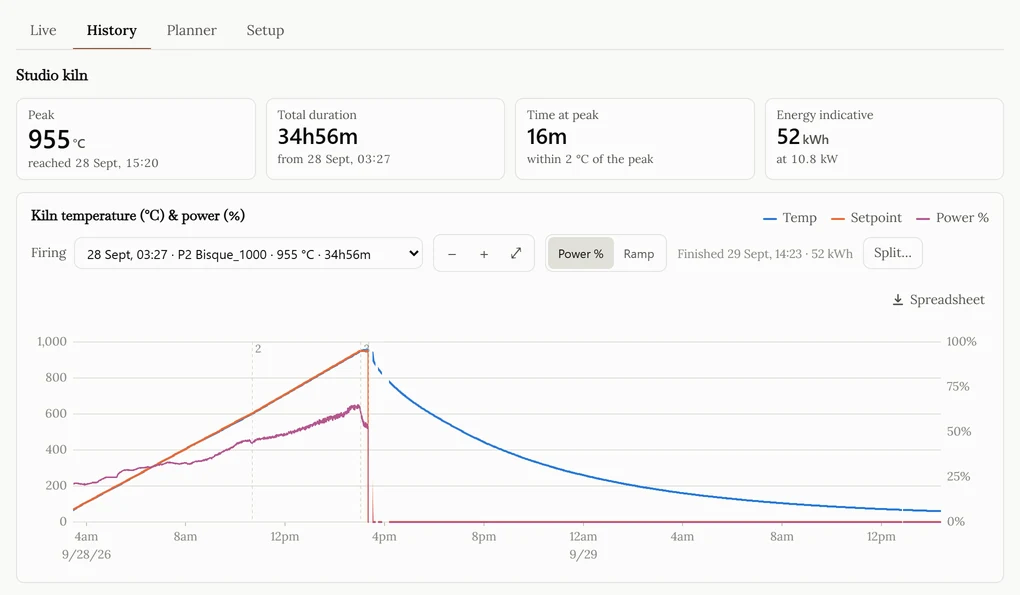
The firings in the demo
Every one of these is a real run on a real kiln, kept exactly as the dashboard kept it. Open any of them and you get the full graph, the programme and its segments, and a spreadsheet of every reading.
| Programme | Date | Peak | Duration |
|---|---|---|---|
| Glaze_Drop&Hold | 13 Oct 2026 | 1209 °C | 38h31m |
| Glaze_Drop&Hold | 8 Oct 2026 | 1205 °C | 31h58m |
| Glaze_Drop&Hold | 5 Oct 2026 | 1209 °C | 29h53m |
| Bisque_950 | 3 Oct 2026 | 955 °C | 34h56m |
| Bisque_950 | 26 Sep 2026 | 89 °C | 2h15m |
| Glaze_Drop&Hold | 26 Sep 2026 | 315 °C | 8h15m |
What you get on top of the Nabertherm app
This sits alongside the MyNabertherm app rather than replacing it. The app is where you operate the kiln — it talks to the controller, and it is the right place to start, change and stop a firing. It answers the question you have while you are standing in front of the kiln: what is it doing now?
This answers the other one: what did it do? Nabertherm’s cloud serves the current snapshot, and this dashboard reads that same snapshot every ten seconds and keeps it, so a firing becomes a record you can go back to rather than a moment you had to be watching. Everything below comes from that one difference.
- A graph of the whole firing — temperature and setpoint together, start to finish, with each segment marked.
- Historical firings, kept — last week’s bisque next to last month’s glaze, months later.
- Element power — the duty cycle under the curve, which is how a tired element shows itself before it fails.
- Real ramp rate — °C per hour the kiln actually achieved, not the one the programme asked for.
- Energy — roughly what the firing cost, in kWh.
- Spreadsheet export — every reading of any firing as .xlsx, for a kiln log, a client, or a certification record.
- Email when it finishes — with the graph attached, so you do not have to keep checking.
- It is a web page — it opens on a laptop as well as on the phone the kiln is paired with.
Will it work with my kiln?
If you can see your kiln in the Nabertherm app, you can see it here: the dashboard signs in to Nabertherm’s cloud with the same login and reads what the app reads. That covers Series 500 controllers — B500, B510, C540, C550, P570 and P580 — in studio pottery and ceramics kilns, and the lab and industrial furnaces that use the same controllers.
It only ever reads. There is no way to start, stop or change a programme from this dashboard, by design — nothing on a web page should be able to turn an element on.
Open the demo dashboard or connect your own kiln. Not sure whether it works with yours? Ask me — I read these myself.